

Pay-as-you-go is the biggest lie in cloud pricing
Cloud Run costs almost nothing. A few dollars a month. Scale to zero, pay only for what you use. The pitch is clean.
Then you actually build something real.
The pitch
Pay-as-you-go sounds like control. You spin up a Cloud Run Service. Traffic is low. The bill is low. You feel like you made the right call.
That feeling lasts until you try to put that service into production.
A Cloud Run container, by itself, is not a production application. It is a compute unit. To turn it into something real, you need a load balancer. You need a database. You need storage. You need networking. Every one of those services has its own pricing model, its own hidden meters, and its own way of surprising you.
The pay-as-you-go part is true for compute. It is not true for the ecosystem your compute depends on to function.
What a real bill actually looks like
I pulled the billing report from a production GCP project I managed for an international client. Eight months of real usage. Total bill: $1,393.98. Here is where the money went:
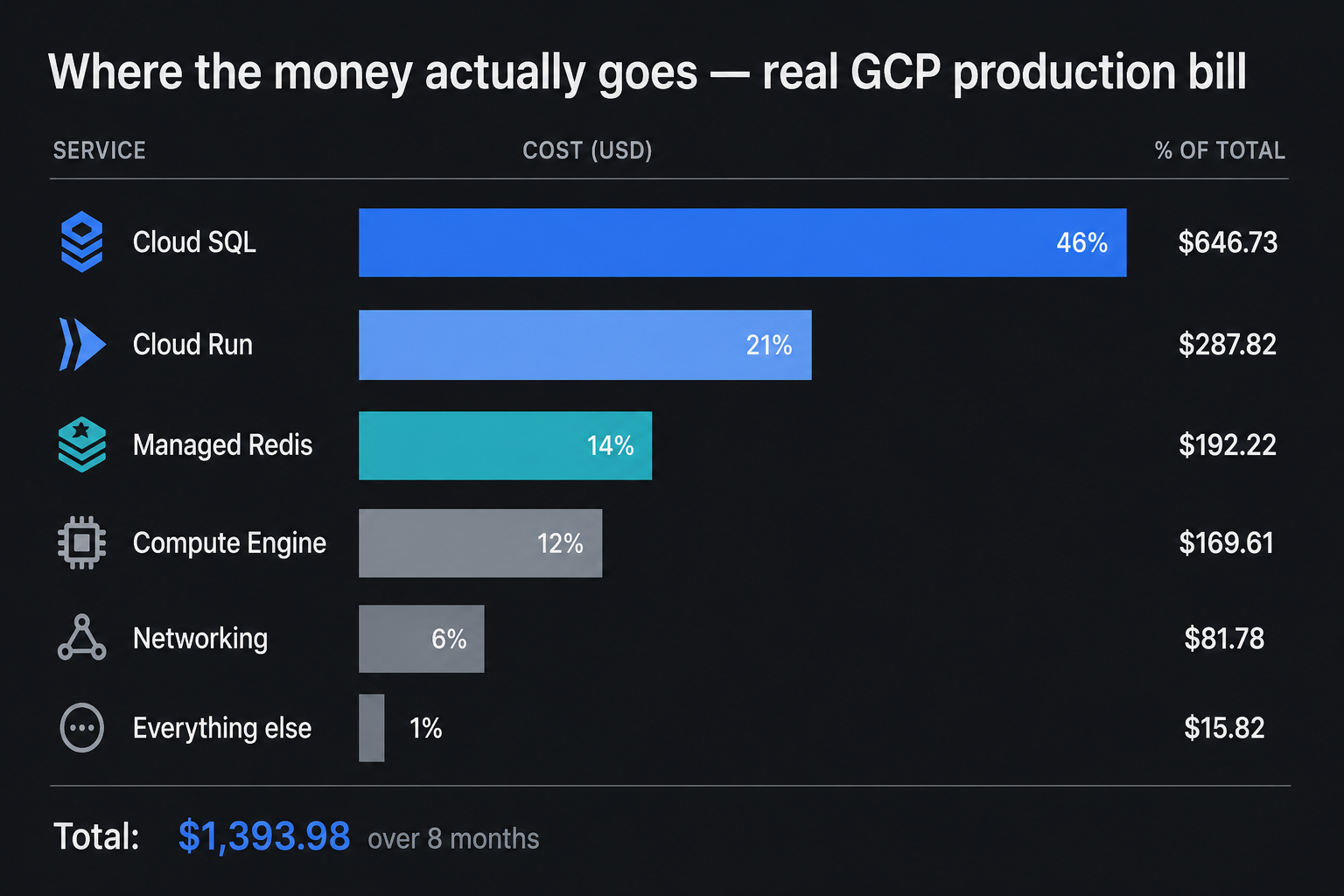
Cloud Run's gross cost before discounts was $653. After sustained use discounts it dropped to $287. The compute everyone worries about was more than cut in half by automatic discounts.
Cloud SQL paid $718.96 gross. After savings: $646.73. The database kept almost everything. That is the real shape of a GCP bill. Compute is forgiving. The supporting services are not.
What the ecosystem actually costs
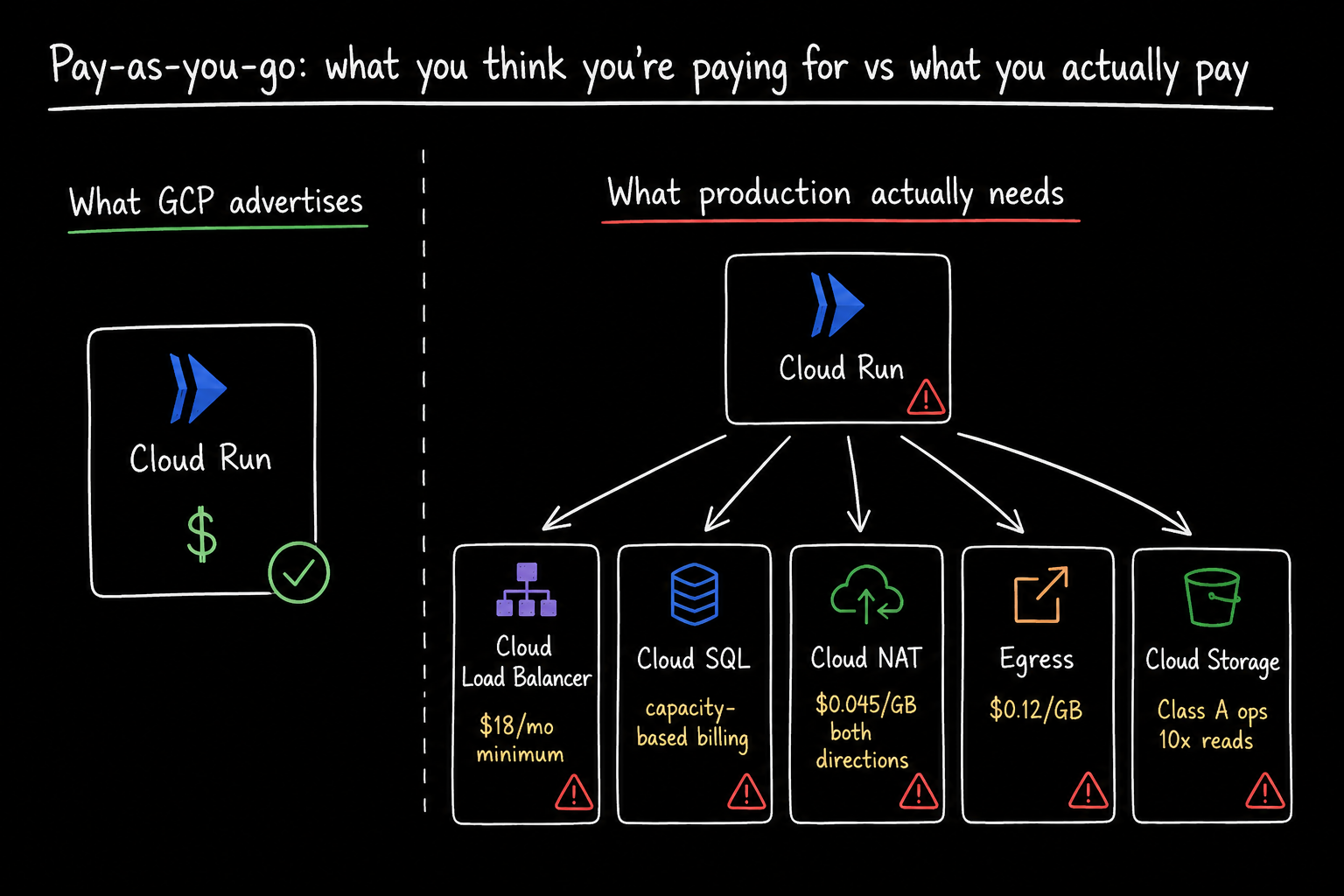
Load balancer: $18/month before a single byte of traffic
Cloud Run gives you a URL. That URL works for basic use. But the moment you need custom domains, SSL termination, path-based routing, or any kind of traffic management across services, you need a Google Cloud Load Balancer.
The first 5 forwarding rules cost $0.025 per hour. That works out to $18/month minimum. The meter starts the moment you create the resources, regardless of whether any traffic flows through it. One engineer found that 96% of the total cost of their Cloud Run application came from the load balancer alone. The Cloud Run compute itself cost nothing. The forwarding rule was the entire bill.
On top of that, outbound data processing is charged per GB by region. A service handling 50 TB/month pays $400-600/month in load balancer processing before counting the forwarding rule fee.
Cloud SQL: the calculator shows $59. The bill shows $923.
This is the one that catches teams hardest. And the billing data above proves it. Cloud SQL was 46% of the total bill on a real production project, more than Cloud Run, Redis, Compute Engine, and Networking combined.
Cloud SQL's pricing page shows you a per-vCPU hourly rate and a per-GB storage rate. Both numbers are accurate. What the page does not show you is how those two numbers combine with HA configuration, read replicas, automatic storage increases you cannot reverse, and idle IPv4 charge that runs whether or not traffic flows, and egress costs that can dwarf the compute bill for data-heavy workloads.
High availability doubles your instance cost. HA in Cloud SQL means a standby replica in a different zone, billed at the same rate as the primary, separate compute, separate storage. HA also raises the SSD storage rate from $0.22/GB-month to $0.34/GB-month, a 55% increase on top of the compute doubling. For a database with 1 TB of storage, that difference is $120/month on storage alone.
Storage auto-grows and never shrinks. Cloud SQL can increase your disk automatically when it runs low. It cannot decrease it. The only way to reduce provisioned storage is to create a new instance at a smaller size, restore a backup to it, and delete the original. Once your database grows to 500 GB after a data migration, you pay for 500 GB every month even if you deleted most of that data last quarter.
Read replicas are each their own billing unit. A primary plus two read replicas at the same spec costs three times the compute and storage of the primary alone.
A worked example shows an actual bill of $923/month against a calculator estimate of $400-450 with default inputs. The gap is the HA storage rate increase, replica storage, idle IPv4 charge, and backup storage that the calculator does not include by default. Always add those manually before you budget.
Egress: the bill that scales with your success
Every API response your service sends is egress. Every database replica you stream across regions is egress. Every image your storage bucket serves to a user is egress.
In the billing data above, networking cost $81.78 after savings. That is a small-medium project. At scale, egress becomes the line that grows fastest because it grows with your success. More users means more responses means more egress.
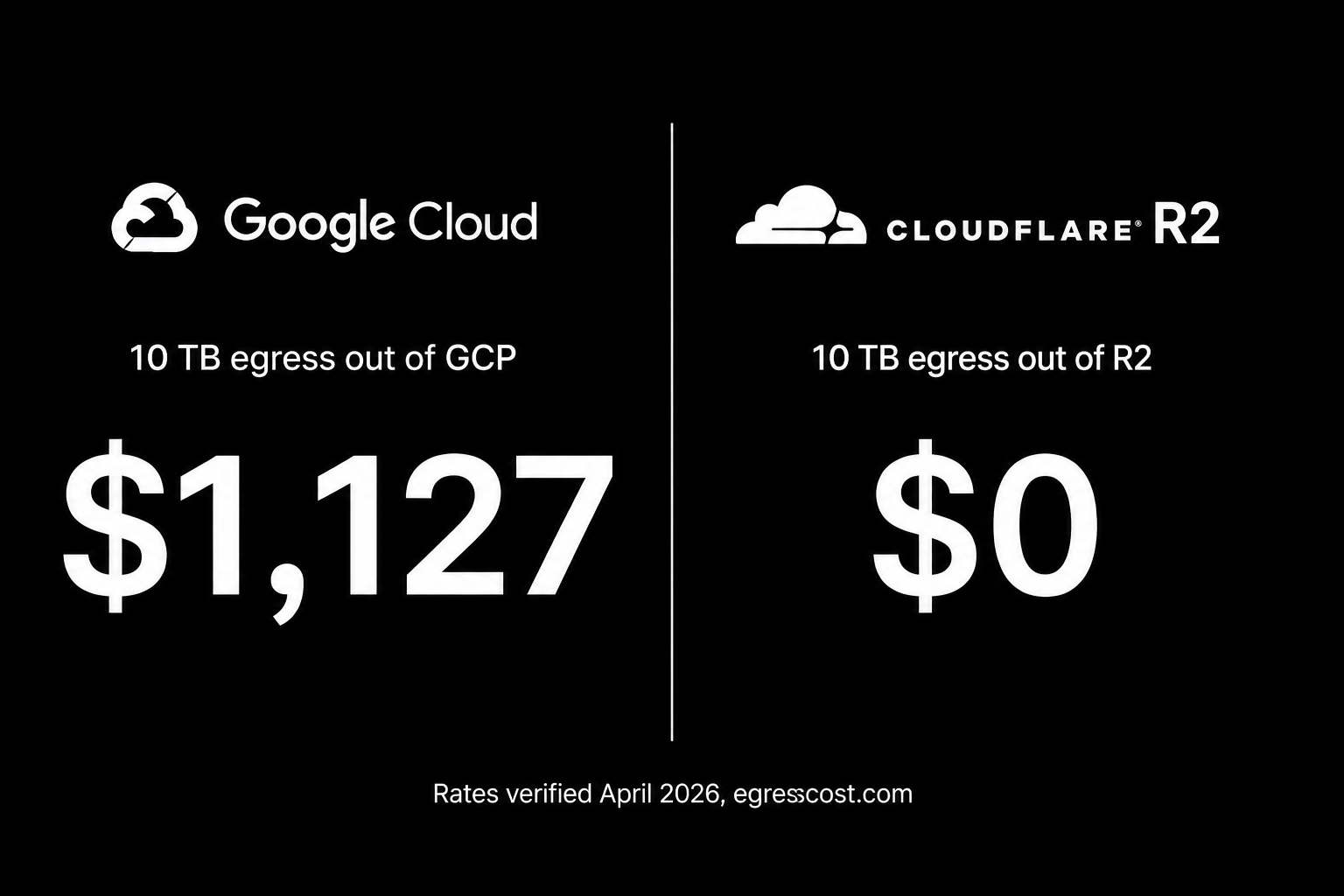
10 TB out of GCP costs approximately $1,127. The same 10 TB on Cloudflare R2 costs $0. Cloud providers charge high egress fees to create switching costs. Getting data in is free. Getting it out is not.
Inter-zone traffic inside the same region is billed. A multi-zone setup with replicas spread across zones generates inter-zone traffic on every replication. 10 TB per month of inter-zone traffic costs around $100. Most teams do not notice it until they look at the BigQuery billing export.
Cloud NAT: $0.045/GB in both directions
If your Cloud Run services connect to Cloud SQL via private IP, which they should for security, you likely have a Cloud NAT gateway in the path.
Cloud NAT pricing has two components. The gateway fee is trivial, $0.0014 per VM per hour capped at $0.044/hour beyond 32 instances. The shock is the data processing fee: $0.045 per GiB, applied to both directions of traffic.
A single GKE node pulling one TB of container images through Cloud NAT on a rebuild generates around $46 in data processing alone, before egress.
The fix costs nothing. Enable Private Google Access on the subnet and traffic to googleapis.com, Container Registry, Artifact Registry, and most other first-party Google services routes through Google's internal backbone without traversing Cloud NAT at all.
Cloud Storage: Cheap to store, expensive to touch
Cloud Storage pricing has two parts that are easy to misread: the storage rate and the operation rate.
Class A operations: writes, listing, and multi-part uploads: cost 10x more than Class B reads. At high request volumes the operation cost can exceed the storage cost entirely.
The cold storage trap: teams move data to Coldline or Archive to cut the storage bill. Archive comes with a 365-day minimum storage duration. Move or delete data earlier and Google applies early deletion fees for the full period. Teams that automate storage transitions without accounting for these rules regularly face surprise costs.
Start with a VPS. Move to the cloud when you have a reason to.
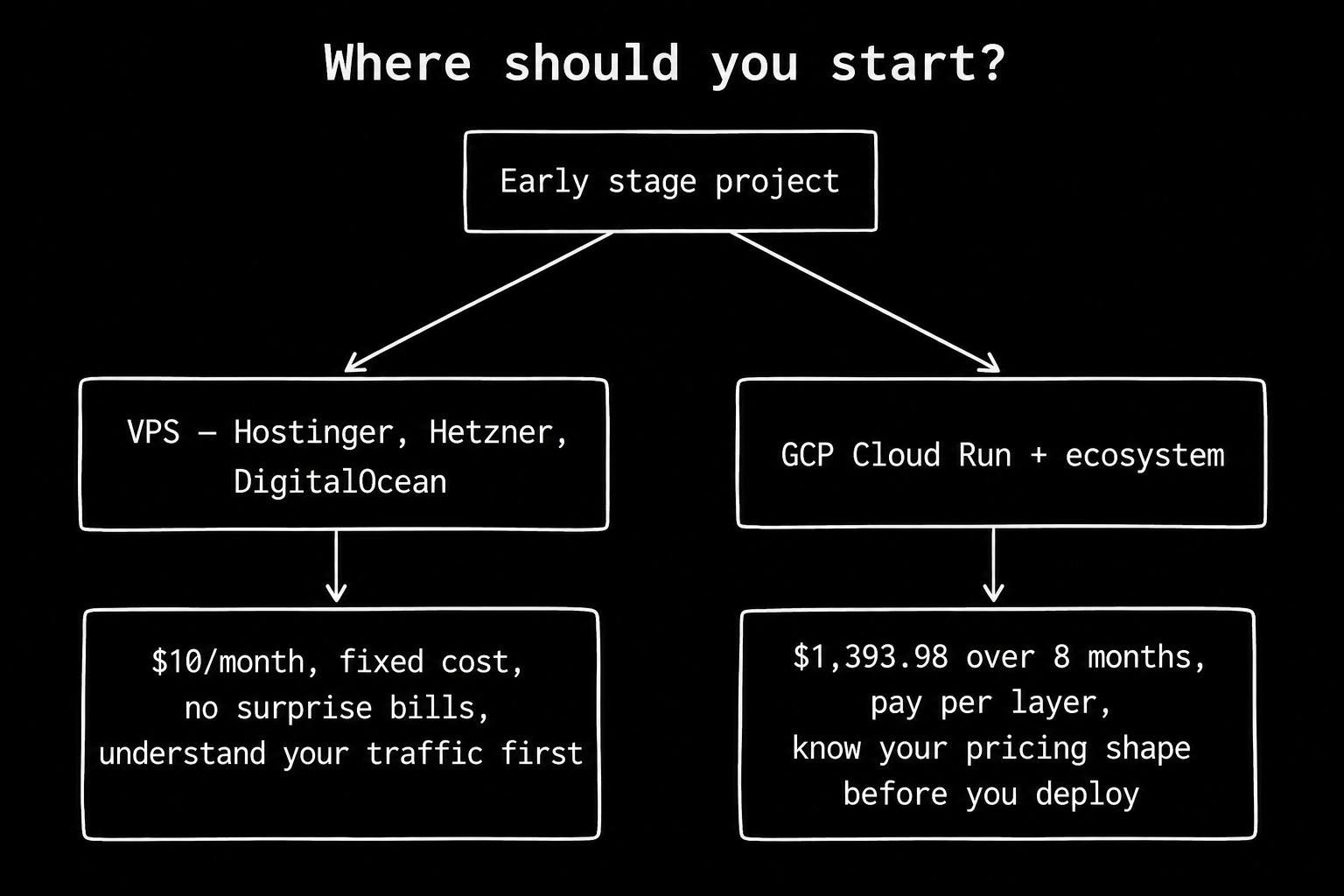
Before any of this becomes your problem, ask whether you need GCP at all.
Most early-stage applications do not. A KVM-based VPS from providers like Hostinger, Hetzner, or DigitalOcean gives you a real server, a fixed monthly cost, and no surprise bills. $10/month gets you a machine that handles more traffic than most early products ever see. You know exactly what you are paying. There are no egress meters, no forwarding rule fees, no NAT data processing charges.
The upgrade path that actually makes sense: start on a VPS. Understand your actual traffic shape. Understand which endpoints carry real load and which are quiet. Once you have real numbers, real concurrency data, and a real reason to need managed services, then move to the cloud. By that point you will know exactly which GCP services you need, which ones you do not, and how to size each one before you provision it.
The teams that get surprised by cloud bills are the ones who started on GCP before they understood their workload. The teams that do not get surprised started simple, measured everything, and moved to cloud with a spec in hand.
What I actually do
Running production systems on GCP for international clients, I have learned where the cost decisions actually happen. Cloud Run handles compute. The supporting cast: Cloud SQL, Cloud Storage, load balancer, NAT: is where the bill surprises live.
The principles that keep bills predictable:
- Measure before provisioning. Size database instances against actual measured traffic, not anticipated peaks. A db-f1-micro handling 20 concurrent connections does not need to be a db-n1-standard-4.
- Don't provision HA you don't need. High availability costs double for the instance, more when you factor in the storage rate increase. If the workload tolerates a brief failover window, a single instance with automated backups is the right call.
- Don't replicate data across regions unless the architecture demands it. A Cloud SQL instance replicating 100 GB/day across regions costs around $360/month in data transfer alone, before counting the replica instance.
- Enable Private Google Access. It costs nothing and eliminates NAT data processing fees for traffic to Google's own services.
- Export billing to BigQuery and actually look at it. The export is free. A simple query against the billing table shows you exactly which SKUs are driving cost. The egress and NAT data processing SKUs are the ones to watch first.
Don't use an axe to cut an apple.
What pay-as-you-go actually means
Cloud Run's pricing is genuinely pay-as-you-go. The service scales to zero. The compute bill is proportional to usage. That part of the pitch is honest.
The problem is that Cloud Run is not a product. It is one layer in a stack. Every layer underneath it: the database, the load balancer, the networking, the storage: has its own pricing shape. Some are capacity-based: you pay for provisioned size regardless of usage. Some have minimum charges: you pay $18/month for a forwarding rule whether you use it or not. Some are directional: egress costs money, ingress does not.
The engineers who get surprised by cloud bills are not careless. They are applying the compute pricing model to services that do not use it.
Every major provider has the same structure: cheap compute, expensive networking, capacity-based databases. The fix is not switching clouds. The fix is understanding the pricing shape of every service you deploy before you deploy it, and sizing each one against what you actually need, not what you think you might someday need.
Build a base case, 5x, and 10x cost model before you commit to a design. Then look at it again when the actual bill arrives. The gap between the model and the bill is where your architecture decisions are hiding.
References
- Google Cloud Load Balancing Pricing.
- Google Cloud SQL Pricing 2026: Instance Costs, Storage, and What the Calculator Hides.
- Optimising the Cost of a Cloud Run Service, Aided with Billing Reporting. Dazbo (Darren Lester), Google Cloud Community, February 2025.
- GCP Pricing: Breaking Down Costs in 2026.
- Cloud Egress 2026: $0 on R2 vs $1,127 on GCP for 10 TB. Rates verified April 2026. egresscost.com
- High Performance Systems Are Not Built, They Are Designed.
- Building a Stock Trend Predictor for a Market That Has No API.